What Is the Best AI for Pine Script?
Author : Ranga Technologies
Publish Date : 3 / 17 / 2026 • 1 mins read
Last Updated : 3 / 17 / 2026

Key Highlights
The best AI tools for Pine Script are purpose-built platforms designed to generate TradingView-compatible code from plain English prompts. Unlike general AI models, these niche tools—such as PineGen AI—are optimized for Pine Script development, offering clean, fast, and usable code for traders and coders alike.
What Is the Best AI for Pine Script?
The best AI for Pine Script is not always the most popular chatbot or code assistant—it’s the one that understands TradingView scripting deeply and delivers results tailored to traders' needs. While some developers use ChatGPT or GitHub Copilot, these tools often fall short when it comes to Pine Script's structure, strategy requirements, and version compatibility.
Instead, developers are gravitating toward dedicated Pine Script AI generators. These tools are specifically trained to handle Pine Script syntax, logic, and real-world use cases—enabling you to go from strategy idea to working code in seconds.
Why Is AI Becoming Popular for Pine Script Development?-
Pine Script is powerful but not always beginner-friendly. Whether you're building a simple RSI-based indicator or a multi-timeframe strategy, even small coding mistakes can throw off your logic—or worse, your trade execution.
That’s why AI-based Pine Script generators are gaining traction. These platforms allow you to:
-
Quickly test new ideas without manually coding
-
Generate working strategies from natural language
-
Reduce the trial-and-error phase
-
Accelerate backtesting and refinement
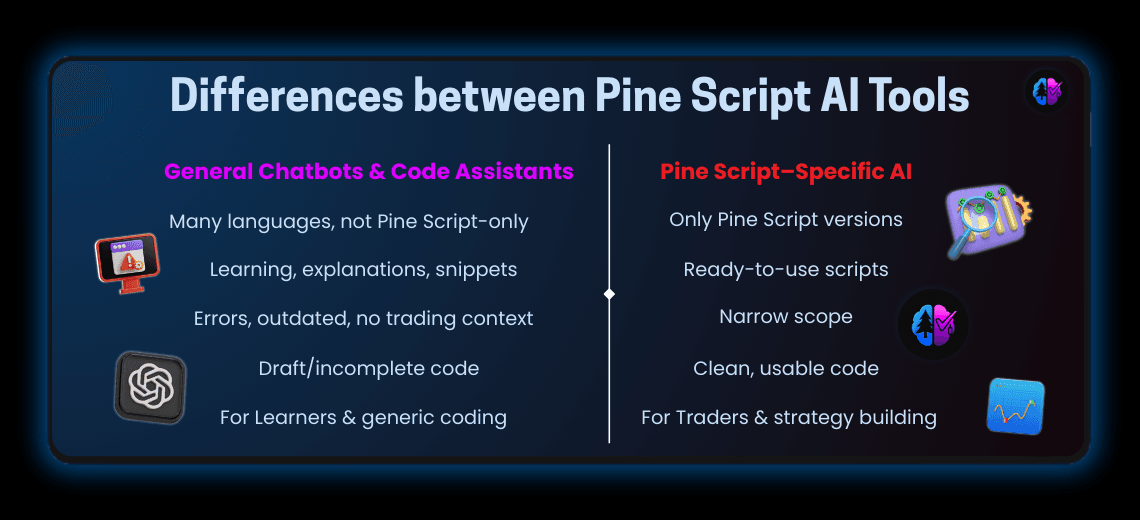
Three Types of AI Tools People Use for Pine Script
Not all AI tools are created equal. Here’s how they break down:
1. General-Purpose AI Chatbots
Models like ChatGPT can assist with Pine Script if prompted carefully, but they aren't trained exclusively on Pine Script. While helpful for learning, their output often includes errors, outdated syntax, or long-winded explanations rather than usable code.
2. Code-Centric Assistants
GitHub Copilot and similar tools can autocomplete code but lack contextual understanding of Pine Script. Their usefulness drops significantly when trying to generate complex strategy logic or combine indicators.
3. Pine Script–Specific AI Tools (e.g., PineGen AI)
Tools like PineGen AI are built exclusively for Pine Script v5. Instead of trying to serve every use case, these platforms focus on one thing: turning trading ideas into Pine Script code.
Why PineGen AI Stands Out Among Pine Script Tools
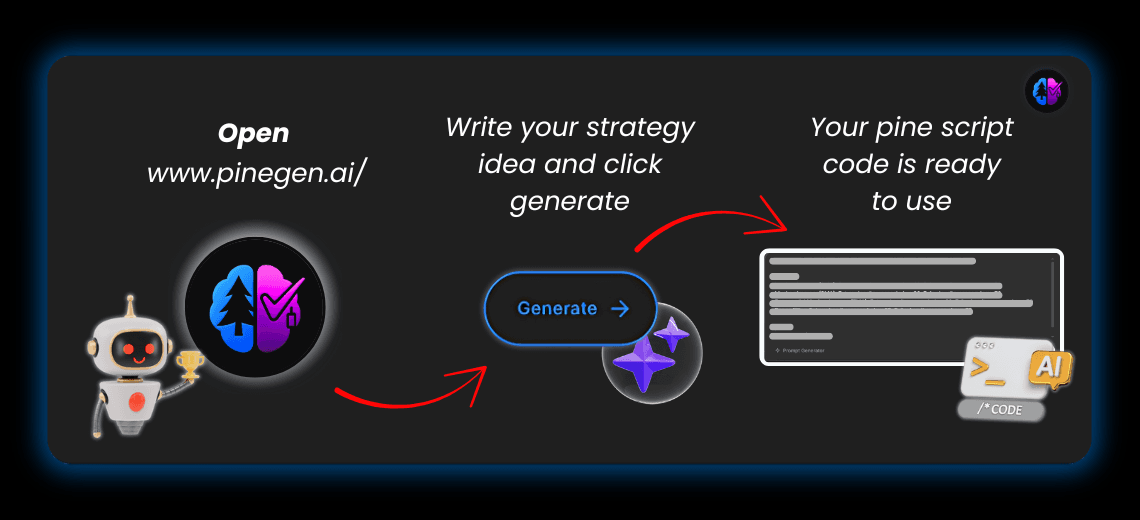
One of the standout solutions in this space is PineGen AI, a dedicated code generator that accepts plain English prompts and returns ready-to-use Pine Script.
With PineGen AI, you don’t need to understand ta.ema(), strategy.exit() parameters, or how to combine plotshape() with logical conditions. You simply describe your idea, such as:
“Build a strategy using 20 EMA crossover above 50 EMA with 1.5% stop loss and RSI confirmation below 70.”
And receive clean, copy-pasteable code in return.
It’s designed specifically for:
-
✅ Strategy generation
-
✅ Custom indicators
-
✅ Alert scripts
-
✅ Risk management logic
-
✅ Multi-timeframe compatibility
And most importantly—it generates code only. It doesn’t try to write articles, generate financial advice, or drift into unrelated domains. That focus on Pine Script code generation is what makes it so effective.
Use Case: From Prompt to Pine Script in Seconds
Prompt:
“Create a simple momentum-based long strategy using RSI crossing above 30 and price above the 50 EMA. Add a 2% take profit and 1% stop loss.”
Output from a specialized AI like PineGen AI:
//@version=5

strategy("RSI Momentum Strategy", overlay=true)

rsi = ta.rsi(close, 14)

ema50 = ta.ema(close, 50)

longCondition = rsi > 30 and close > ema50

if (longCondition)

strategy.entry("Long", strategy.long)

strategy.exit("Exit", from_entry="Long", stop=close * 0.99, limit=close * 1.02)

plot(ema50, color=color.orange)
This type of precision and usability is hard to get with general-purpose AI tools.
What Should You Look for in a Pine Script AI Tool?
If you're evaluating your options, here are key features that define a great Pine Script generator:
-
⚡ Fast response time
-
🧠 Understands trading logic clearly
-
✅ Outputs error-free Pine Script v5 code
-
📊 Handles both indicators and strategies
-
✍️ Clean formatting and comments
-
🔒 No fluff—just code
PineGen AI checks all these boxes by design, helping both beginner traders and seasoned coders get more done in less time.
Benefits of Using PineGen AI (and Similar Tools)
-
Time-efficient: Skip boilerplate code and go straight to testing.
-
Customizable: Tweak prompts for different assets, timeframes, or setups.
-
No coding required: Ideal for traders who want to automate without learning a full language.
-
Backtest-ready: Easily load code into TradingView’s Strategy Tester.
-
Focused: Doesn’t try to blog, summarize, or chat—just generates Pine Script.
Final Thoughts: Choose Tools That Specialize in Pine Script
With so many AI tools on the market, it’s easy to get overwhelmed. But if your goal is to write or test Pine Script code—don’t settle for general-purpose AI.
Tools like PineGen AI represent a new wave of highly specialized, results-driven AI that aligns perfectly with the needs of modern traders and script developers.
The next time you have a strategy idea, skip the blank editor. Just type your prompt into PineGen AI and get to testing.