VWAP Indicator in Pine Script: A Real User’s Take with Pinegen AI
Author : Ranga Technologies
Publish Date : 3 / 17 / 2026 • 2 mins read
Last Updated : 3 / 17 / 2026
The VWAP indicator (Volume Weighted Average Price) is a critical tool in modern intraday trading strategies. Using Pinegen AI, traders can now generate accurate, customizable VWAP Pine Script code without writing it manually. Whether you’re building VWAP strategies in Pine Script v6, creating real-time alerts in TradingView, or testing volume-based logic, AI-powered Pine Script tools like Pinegen simplify the entire process.
Table of Contents
- What Is VWAP and its importance
- Build a VWAP Strategy in pinescript
- VWAP Trading With Pinegen AI (Step by step guide)
- VWAP Strategy Pine Script Code Example
- How to use VWAP strategy on tradingview
- Real-Time Data + VWAP in Pine Script
- Best Pine Script AI Tool for VWAP
- Final Thoughts
- FAQ
What Is VWAP in Trading and Why It Matters to Traders
What is VWAP in trading?
VWAP stands for Volume Weighted Average Price, and it’s used by professional and retail traders alike to determine the average trading price of a stock or index throughout the day, factoring in both price and volume. Unlike a simple moving average, VWAP reflects where the bulk of volume is trading and acts as a dynamic benchmark.
Institutions often use VWAP as a guide for large buy or sell orders to ensure they are executing trades near the market’s volume-weighted average. For intraday traders, VWAP is essential to identify overbought and oversold conditions in real time. If price is trading above VWAP, it’s generally considered bullish; if it’s below, bearish.
This is why VWAP in Pine Script is highly sought after by TradingView users. It helps:
- Identify institutional support and resistance
- Confirm intraday trend direction
- Time entries and exits based on volume behavior
Why I Used Pinegen AI to Build a VWAP Strategy in Pine Script
As a trader deeply involved in building custom TradingView indicators, I’ve always found VWAP using Pine Script a bit tricky due to its logic-heavy structure. Calculating cumulative price-volume values, resetting at the session start, and plotting consistently takes effort, especially in Pine Script v6.
That’s when I started using Pinegen AI, a Pine Script automation tool that lets you generate strategies and indicators by simply describing them in plain language. I typed:
“Create a VWAP indicator in Pine Script that resets every session and plots the VWAP line with color and alert support.”
In seconds, Pinegen returned a fully functional, clean script that worked immediately inside the platform — complete with live preview and instant backtesting built into Pinegen AI.
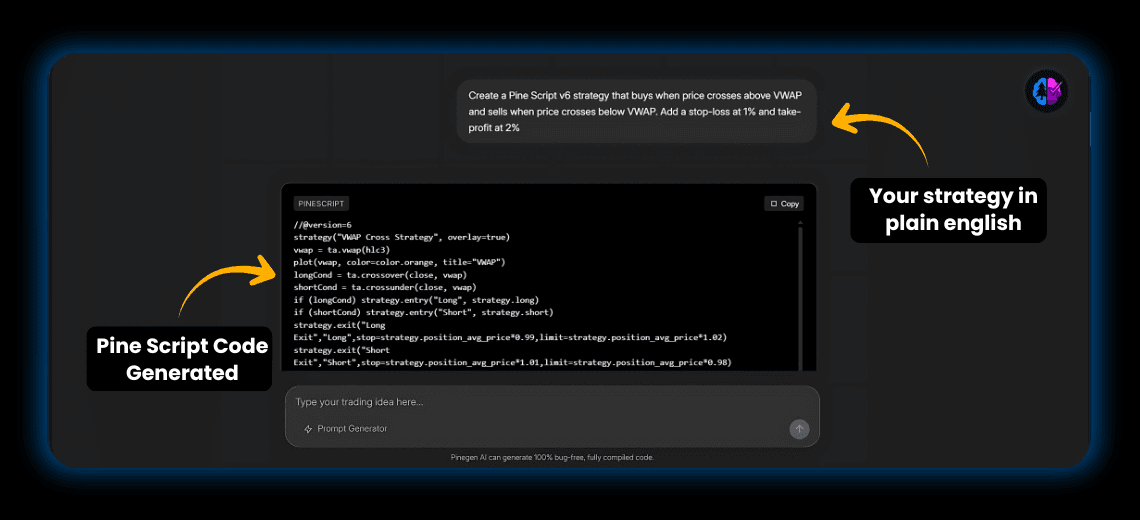
How to Add VWAP to Your Trading With Pinegen AI Step-by-Step:
If you want to create and apply a VWAP indicator using Pinegen AI, here’s how you can do it step by step:
1.Go to Pinegen AI
Visit https://www.pinegen.ai.
2.Enter Your Prompt
Describe your strategy in plain English, such as:
“Create a Pine Script v6 strategy that buys when price crosses above VWAP and sells when price crosses below VWAP. Add a stop-loss at 1% and take-profit at 2%”
3.Generate the Code and Preview Instantly
Pinegen will produce clean, usable Pine Script v6 code and show you a live preview and backtest directly in Pinegen AI, so you can confirm the logic before exporting.
4.Customize or Update
Adjust parameters, colors, or add conditions right inside Pinegen AI. You can also regenerate updated scripts in seconds without manual edits.
This process saves hours of manual coding and ensures your VWAP logic is accurate, real-time, and fully tested before adding to TradingView.
VWAP Strategy Pine Script Code Example using Pinegen AI
//@version=6
indicator("Session VWAP with Pinegen AI", overlay=true)
var float cum_vol_price = 0.0
var float cum_vol = 0.0
if ta.change(time("D"))
cum_vol_price := 0.0
cum_vol := 0.0
cum_vol_price += close * volume
cum_vol += volume
vwap = cum_vol != 0 ? cum_vol_price / cum_vol : na
plot(vwap, color=color.orange, linewidth=2, title="VWAP")
This VWAP Pine Script code is compatible with all major assets on TradingView, including Nifty 50, Nifty Bank, US stocks, and crypto pairs.
How to Use VWAP in a Trading Strategy on TradingView
Once I had the indicator ready, I started integrating it into my trading logic. Some common ways to use VWAP in strategies include:
-
VWAP pullback entries: Enter trades when price reverts to VWAP in a trending market.
-
VWAP breakouts: Trade breakouts when price crosses VWAP with volume confirmation.
-
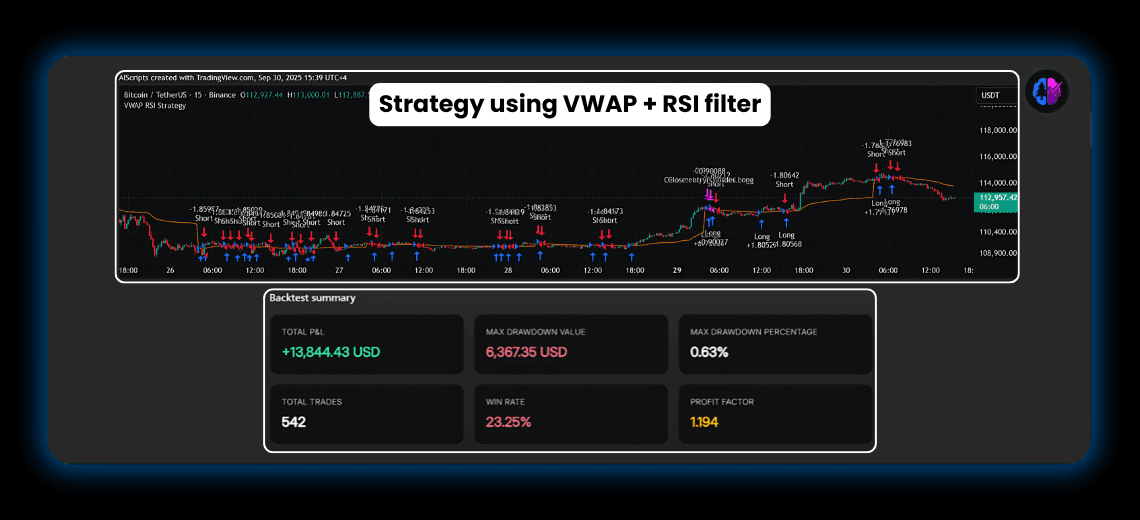
VWAP + RSI or MACD filters: Combine VWAP with other indicators to reduce false signals.
-
VWAP as a dynamic stop-loss or target: Exit trades when price returns to VWAP after a run.
With Pinegen AI, I also generated a strategy that uses VWAP along with EMA crossovers, where:
- Buy: Price is above VWAP and 9 EMA > 21 EMA
- Sell: Price closes below VWAP or RSI crosses under 50
And I didn’t write a single line of code manually. Pinegen AI generated everything, including Pine Script alertconditions, parameter inputs, and visual plots.
Real-Time Data + VWAP in Pine Script
What makes VWAP so effective is how it reacts to real-time volume and price data. On TradingView, you have access to rich streaming data, and Pine Script makes it possible to build automated alerts based on that data. The challenge is that scripting VWAP logic manually often leads to errors or inefficiencies.
That’s where Pinegen AI truly shines. It eliminates the need to:
-
Manually reset VWAP logic every day
-
Handle conditional logic for volume-weighted math
-
Troubleshoot syntax errors in Pine Script v6
By using this AI Pine Script tool, I saved hours of work and was able to visually backtest strategies across the Nifty 50, S&P 500, and even crypto markets.
Best Pine Script AI Tool for VWAP and Custom Indicator Automation
There are several Pine Script tools online, but Pinegen AI stands out as the best AI Pine Script generator for traders who want:
-
Instant generation of VWAP indicators
-
Customizable Pine Script code for alerts and overlays
-
Backtestable strategies based on real intraday logic
-
Pine Script v6 compatibility with input controls and multiple indicators
Whether you’re creating a VWAP alert on TradingView, building a VWAP swing strategy, or just trying to visualize institutional zones in the market, Pinegen AI gives you that power in seconds.
Final Thoughts: From VWAP Concepts to TradingView Scripts with AI
For years, I thought coding was a barrier to building professional indicators. But with AI-powered Pine Script tools like Pinegen AI, that barrier is gone. I now create, test, and automate VWAP trading strategies on the fly.
If you’ve ever asked:
-
How do I create VWAP in Pine Script?
-
What’s the best way to use VWAP with other indicators?
-
Can I automate VWAP alerts in TradingView?
The answer is yes — and you don’t need to write the code yourself. Pinegen AI is built exactly for this: to turn your trading ideas into powerful Pine Script strategies without the technical hassle.