How Intelligent Tools Are Enhancing Developer Productivity
Author : Ranga Technologies
Publish Date : 3 / 17 / 2026 • 1 mins read
Last Updated : 3 / 17 / 2026
The integration of AI-powered features into modern Integrated Development Environments (IDEs) is revolutionizing how developers write, review, and debug code. Tools like Google’s Gemini Code Assist, JetBrains AI Assistant, and others embedded in popular IDEs such as Visual Studio Code and IntelliJ are making coding faster, smarter, and more efficient.
AI-Powered Features in Today’s IDEs
1. Smart Code Suggestions and Auto-Completion
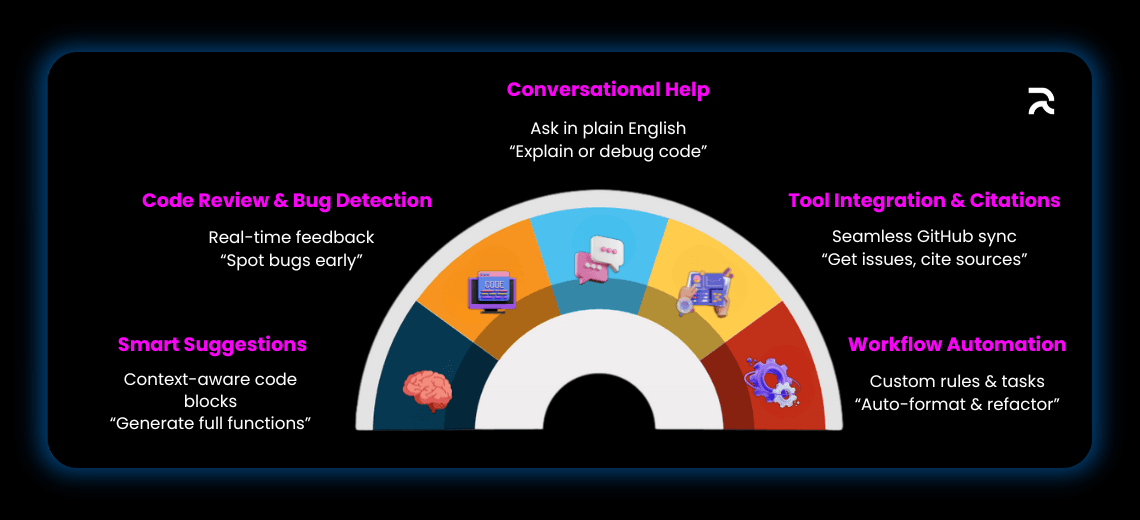
AI assistants provide real-time, context-aware code completions that go beyond simple syntax hints. For example, Google’s Gemini Code Assist, powered by the Gemini 2.5 Pro model, offers smarter suggestions by understanding the broader code context, enabling it to generate entire functions or code blocks from comments or prompts. Similarly, JetBrains AI Assistant uses its Mellum large language model to deliver fast, accurate, and syntax-aware completions across languages like Java, Python, Kotlin, and more.
2. Automated Code Reviews and Bug Detection
AI tools embedded in IDEs can automatically review code as it is written, flagging potential bugs, security vulnerabilities, or style inconsistencies. Gemini Code Assist includes a sharpened GitHub code review agent that spots issues early in the development cycle. JetBrains AI Assistant can identify potential bugs and suggest optimizations on the fly, helping maintain code quality without interrupting workflow.
3. Conversational AI Assistance
Developers can interact with AI chat assistants directly within their IDEs, asking questions about their code, requesting explanations for complex logic, or getting help with debugging. Gemini Code Assist supports multi-file context, allowing developers to include entire folders in prompts and manage multiple chat sessions seamlessly. JetBrains AI Assistant offers a natural language chat interface tailored to the specific project and programming language.
4. Custom Commands and Workflow Automation
Gemini Code Assist now supports Custom Commands and Rules, enabling teams to automate repetitive tasks and enforce project style guides consistently. This feature accelerates routine operations, such as formatting, refactoring, or applying coding standards, directly within the IDE.
5. Integration with External Tools and Source Citation
AI assistants can pull information and perform actions from external services like GitHub, enabling developers to fetch assigned issues or repository data without leaving the IDE. Additionally, Gemini Code Assist provides source citations when quoting or generating code from external repositories, helping developers comply with licensing and intellectual property requirements.
Tips to Maximize AI Tools While Maintaining Code Quality and Security
-
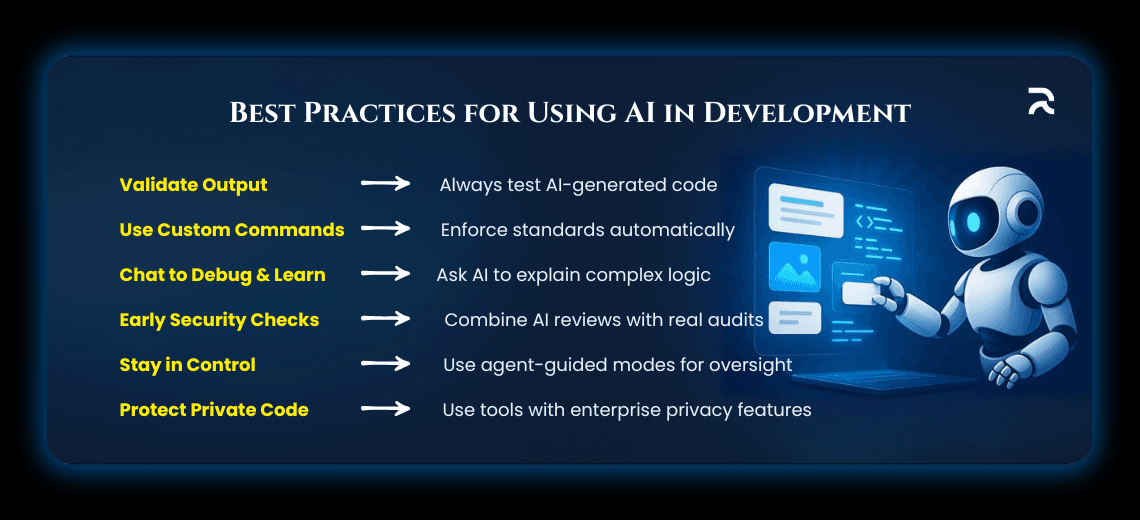
Validate AI-Generated Code: AI outputs can sometimes be plausible but incorrect. Always review and test generated code thoroughly before deployment.
-
Leverage Custom Commands for Consistency: Use features like Gemini’s Custom Commands to enforce coding standards and reduce manual oversight.
-
Use Conversational AI for Learning and Debugging: Engage with AI chat assistants to understand confusing code sections, which can speed up onboarding and troubleshooting.
-
Integrate Security Checks Early: Utilize AI’s bug detection and code review capabilities to catch vulnerabilities early, but complement this with dedicated security audits.
-
Maintain Control with Agentic Modes: Tools like JetBrains AI Assistant offer modes where developers guide AI through complex tasks, ensuring human oversight over automated changes.
-
Keep Sensitive Code Private: For enterprise environments, use AI tools that support private codebase integration and comply with data privacy standards, such as Gemini Code Assist Enterprise.
Conclusion
AI-powered features embedded in modern IDEs are transforming software development by enhancing productivity, improving code quality, and reducing cognitive load on developers. From smart code completions and automated reviews to conversational assistants and workflow automation, these intelligent tools are becoming indispensable collaborators in the coding process. By thoughtfully integrating and managing AI assistance, developers can unlock new levels of efficiency and innovation while maintaining high standards of code quality and security.
This new era of AI-enhanced IDEs is not just about faster coding — it’s about smarter, more reliable, and more enjoyable software development.