Building Multi-Timeframe Strategies in Pine Script with AI
Author : Ranga Technologies
Publish Date : 6 / 11 / 2026 • 3 mins read
Last Updated : 6 / 11 / 2026
Are Traders Still Building Multi-Timeframe TradingView Strategies Manually in 2026?
Multi-timeframe trading has always been one of the most powerful ways to analyze markets. Traders use higher timeframes to understand the overall trend while relying on lower timeframes for precise entries, exits, and confirmations.
But building those strategies inside TradingView has traditionally been difficult.
Many traders spend hours manually configuring timeframe synchronization, debugging Pine Script errors, managing request.security() calls, fixing repainting issues, and validating backtesting results before a strategy even becomes usable.
In 2026, AI-assisted Pine Script development is changing that workflow completely.
Instead of manually building complex TradingView strategies line by line, traders are increasingly using AI to generate Pine Script structures, simplify debugging, accelerate backtesting, and optimize multi-timeframe logic much faster than traditional workflows.
That shift is one of the reasons platforms like PineGen AI are becoming increasingly relevant for TradingView users exploring automation and AI trading strategies.
Multi-timeframe Pine Script strategies are becoming increasingly popular among TradingView traders looking to improve confirmations, trend analysis, and execution timing. However, traditional Pine Script development often involves complex TradingView logic, timeframe synchronization issues, repainting risks, debugging challenges, and slower optimization cycles.
This article explores what multi-timeframe trading means, why traders use MTF strategies, how AI is transforming Pine Script development, and why AI-powered platforms like PineGen AI are helping simplify TradingView automation, Pine Script coding, backtesting workflows, and AI-assisted strategy development in 2026.
1. What Is a Multi-Timeframe Strategy?
A multi-timeframe strategy is a trading approach that combines data from multiple chart intervals to improve trading decisions.
For example, a trader might use the 1-hour chart to identify the broader market trend while using the 15-minute chart to find precise entry opportunities. Some traders even combine higher timeframes like the daily chart with lower execution timeframes such as the 5-minute chart.
The goal is simple.
Higher timeframes provide stronger trend confirmation while lower timeframes improve precision and execution timing.
This approach is widely used because relying on only one timeframe can sometimes create weak signals or misleading market direction.
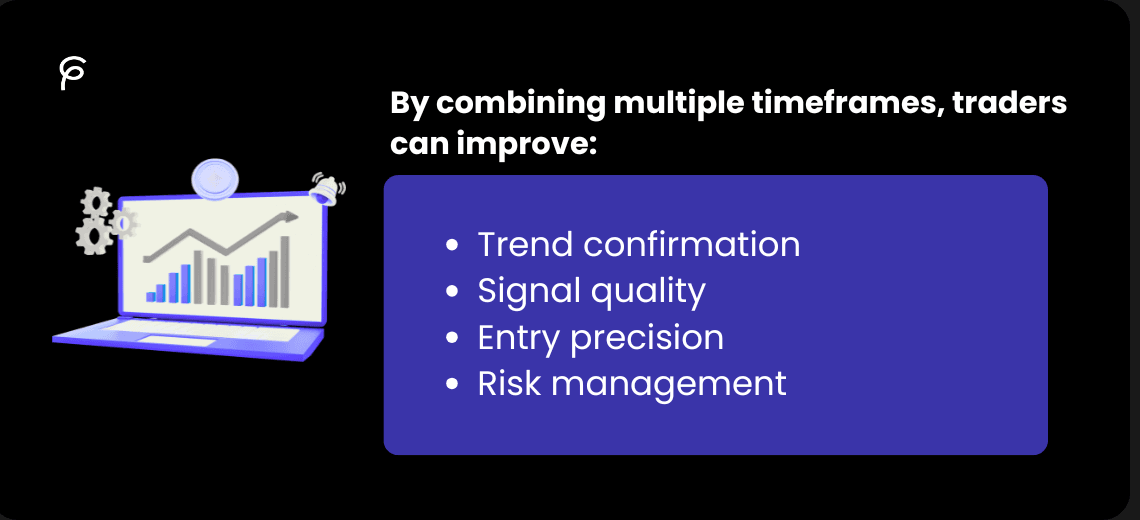
By combining multiple timeframes, traders can improve:
-
Trend confirmation - Higher timeframe analysis helps traders identify the dominant market direction before taking lower timeframe trades.
-
Signal quality - Multi-timeframe confirmation helps reduce weaker setups that appear valid on only one chart interval.
-
Entry precision - Lower timeframe analysis allows traders to optimize entries, stop-loss placement, and execution timing.
-
Risk management - Aligning trades with higher timeframe trends can help traders avoid trading against stronger market momentum.
2. Why Traders Use Multi-Timeframe Analysis
Modern traders are increasingly looking for stronger confirmations before entering trades.
Instead of reacting only to short-term price movement, traders want to understand the broader market structure before executing positions.
For example, a trader may only take long trades on the 15-minute chart when the 1-hour chart remains bullish.
That additional confirmation layer helps filter weaker trades.
Multi-timeframe workflows are especially popular among TradingView traders because the platform allows users to combine indicators, alerts, and Pine Script logic across multiple chart intervals.
However, manually building those workflows inside Pine Script can quickly become technically challenging.
Many traders understand market logic very well but struggle with:
-
Pine Script formatting
-
TradingView compatibility
-
timeframe synchronization
-
strategy optimization
That friction between trading ideas and technical implementation is one of the biggest reasons AI-assisted Pine Script workflows are growing so rapidly.
3. Why Multi-Timeframe Pine Script Development Is Difficult
Building multi-timeframe strategies inside TradingView is very different from creating simple indicator scripts.
MTF workflows introduce several technical challenges that many beginner traders and non-programmers struggle with.
-
request.security() handling - Multi-timeframe data retrieval requires careful synchronization between higher and lower timeframe calculations.
-
Repainting issues - Incorrect MTF implementation can cause strategies to behave differently during historical backtests compared to live market conditions.
-
Timeframe alignment - Entries and confirmations must remain synchronized correctly across different chart intervals.
-
Backtesting complexity - Multi-timeframe logic can produce misleading results if conditions are not structured properly.
-
Performance optimization - Larger MTF strategies can become computationally heavy and difficult to optimize efficiently.
These problems are one of the biggest reasons many traders avoid advanced TradingView automation even when they understand trading concepts.
4. The Rise of AI-Assisted Pine Script Development
Artificial intelligence is rapidly changing how coding workflows operate across multiple industries, and TradingView strategy development is evolving alongside it.
Developers across the software industry are increasingly using AI-assisted workflows for:
-
debugging
-
workflow automation
-
optimization
-
faster iteration cycles
That same transformation is now happening inside Pine Script development.
In the past, traders spent most of their time:
-
learning Pine Script syntax
-
fixing compiler errors
-
manually structuring strategies
-
debugging TradingView compatibility issues
-
rebuilding scripts repeatedly
Today, the workflow is shifting toward:
-
Strategy refinement - Traders can spend more time improving entries, exits, confirmations, and risk management instead of fixing syntax problems.
-
Faster experimentation - Multiple strategy variations can be tested quickly without manually rebuilding Pine Script structures every time.
-
Backtesting workflows - AI-assisted development helps accelerate historical testing and strategy optimization.
-
Workflow efficiency - Traders can focus more on trading logic rather than repetitive development work.
This shift is one of the biggest reasons AI-powered Pine Script development is growing rapidly among TradingView users in 2026.
5. How AI Is Changing TradingView Workflows
Many traders still assume Pine Script development requires advanced programming experience.
That is changing.
AI-assisted workflows are simplifying how TradingView strategies are created by allowing traders to describe setups naturally instead of manually coding every component from scratch.
For example, instead of manually coding:
-
RSI conditions - Traders normally need to define RSI calculations, crossover conditions, overbought and oversold levels, and confirmation logic manually inside Pine Script.
-
EMA crossovers - Moving average strategies require properly structured crossover logic, fast and slow EMA calculations, and correctly configured trade entries.
-
Stop-loss logic - Traders often need to manually configure ATR stops, percentage-based exits, trailing stops, or custom risk management conditions.
-
Breakout confirmations - Breakout strategies may require volume filters, support and resistance validation, candle confirmations, and volatility checks.
Instead of building all these components manually, traders can now describe the strategy naturally and refine the generated Pine Script afterward.
That workflow is fundamentally changing how Pine Script strategy development works in 2026.
6. How PineGen AI Fits Into This Shift
Many general AI chatbots can generate code, but Pine Script development requires TradingView-specific understanding.
That specialization matters because TradingView automation depends heavily on:
-
Pine Script syntax - TradingView strategies require compatible Pine Script formatting and correct version handling.
-
Strategy structure - Entries, exits, confirmations, alerts, and risk management must work correctly during backtesting.
-
TradingView compatibility - Strategies must behave properly within TradingView’s Pine Editor and execution system.
-
Multi-timeframe workflows - MTF strategies require accurate timeframe synchronization and proper request.security() implementation.
Platforms like PineGen AI focus specifically on Pine Script and TradingView automation instead of acting as generic AI coding assistants.
That focused workflow reduces many of the frustrations traders experience when using broader AI tools.
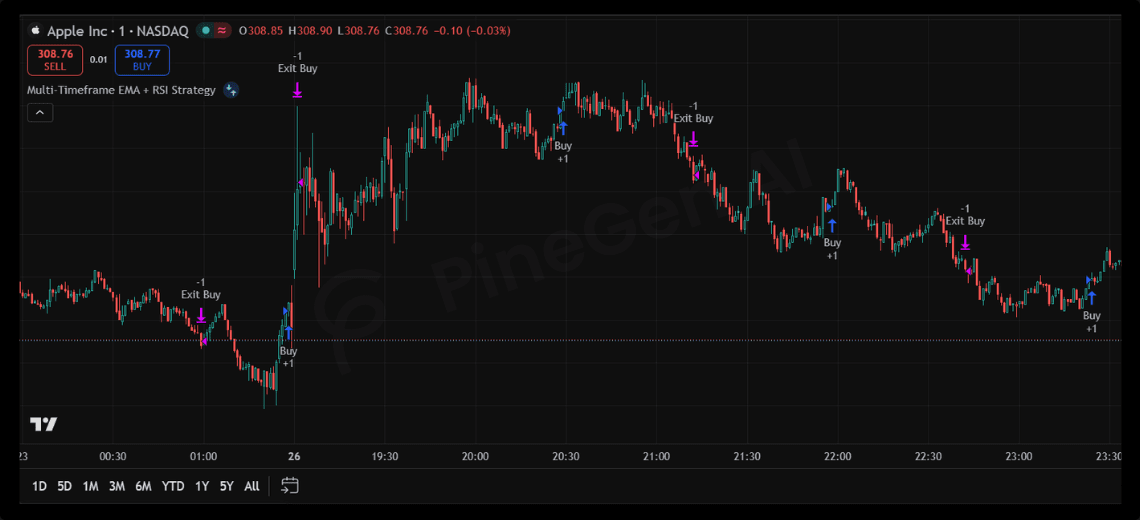
7. Example Multi-Timeframe Pine Script Strategy
pinescript//@version=6
strategy("Multi-Timeframe EMA + RSI Strategy", overlay=true)

// Higher Timeframe EMA
higherTFEMA = request.security(syminfo.tickerid, "60", ta.ema(close, 50))

// Current Timeframe Indicators
fastEMA = ta.ema(close, 9)
slowEMA = ta.ema(close, 21)
rsiValue = ta.rsi(close, 14)

// Trend Confirmation
bullishTrend = close > higherTFEMA

// Entry Conditions
longCondition = ta.crossover(fastEMA, slowEMA) and rsiValue > 50 and bullishTrend

shortCondition = ta.crossunder(fastEMA, slowEMA) and rsiValue < 50 and not bullishTrend

// Execute Trades
if longCondition
    strategy.entry("Buy", strategy.long)

if shortCondition
    strategy.entry("Sell", strategy.short)

// Risk Management
strategy.exit("Exit Buy", from_entry="Buy", profit=150, loss=75)
strategy.exit("Exit Sell", from_entry="Sell", profit=150, loss=75)
This example combines:
-
higher timeframe trend confirmation
-
lower timeframe EMA crossovers
-
RSI filtering
-
multi-timeframe logic
-
risk management
Traditionally, traders would manually debug synchronization issues, optimize strategy behavior, and repeatedly validate TradingView compatibility.
AI-assisted Pine Script workflows simplify much of that process by helping traders generate and refine strategy structures much faster.
8. Common Problems in Multi-Timeframe Strategies
Even well-designed MTF strategies can contain hidden problems if not tested carefully.
Some of the most common issues include:
-
Repainting behavior - Historical signals may appear accurate while behaving differently during live trading
-
Delayed confirmations - Higher timeframe conditions can sometimes create lagging entries on lower chart intervals.
-
Over-optimization - Strategies may become too dependent on historical market conditions and fail in live markets.
-
Execution inconsistencies - Incorrect timeframe synchronization can create unrealistic backtesting performance.
-
Poor risk management - Some strategies focus heavily on entries while neglecting realistic stop-loss or drawdown control.
That is why traders still need:
-
proper validation
-
realistic testing
-
manual review
-
optimization
-
trading knowledge
even when using AI-assisted Pine Script development.
9. Why Specialized Pine Script AI Matters
One of the biggest frustrations traders discuss online is that general AI coding tools sometimes generate:
-
Outdated Pine Script versions - Some AI models produce deprecated Pine Script syntax or unsupported functions.
-
Broken strategy logic - Generated strategies may contain unrealistic entries, incorrect exits, or faulty confirmations.
-
Invalid TradingView functions - General AI tools sometimes generate unsupported TradingView logic that causes compilation failures.
-
Incomplete strategy structures - Some generated scripts miss important components such as risk management, alerts, or confirmation logic.
That is why many traders are increasingly looking for Pine Script-focused AI workflows instead of relying entirely on broader AI chatbots.
Specialized workflows often create:
-
smoother Pine Script development
-
better TradingView compatibility
-
faster debugging
-
improved strategy iteration
-
more reliable TradingView automation
10. The Future of AI Trading Strategy Development
TradingView development is becoming increasingly AI-assisted.
Traders are moving away from workflows that require:
-
repetitive coding
-
manual debugging
-
syntax-heavy development
-
slower optimization cycles
and toward workflows focused on:
-
Rapid testing - Traders can validate ideas much faster without manually rebuilding strategies repeatedly.
-
Workflow efficiency - AI-assisted workflows reduce repetitive coding tasks and simplify strategy creation.
-
AI-assisted generation - Artificial intelligence helps generate Pine Script structures, indicators, and TradingView strategies faster.
-
Faster optimization - Traders can refine entries, exits, risk settings, and confirmations through quicker experimentation.
-
Strategy refinement - More time can be spent improving logic and market behavior instead of fixing technical implementation issues.
But AI is not replacing trading expertise.
The strongest workflows combine:
-
AI-assisted Pine Script generation
-
human validation
-
TradingView testing
-
trading experience
That balance will likely define the future of Pine Script development.
11. Conclusion: Multi-Timeframe Pine Script Development Is Becoming Smarter
Multi-timeframe trading remains one of the most powerful approaches in technical analysis, but traditional Pine Script development workflows can become highly technical and time-consuming.
AI-assisted development is changing that experience by helping traders generate, refine, optimize, and test TradingView strategies much faster than traditional manual workflows.
Platforms like PineGen AI are helping simplify Pine Script development by focusing specifically on:
-
TradingView workflows
-
Pine Script generation
-
strategy refinement
-
AI-assisted debugging
-
multi-timeframe strategy development
-
faster TradingView automation
But successful strategy development still depends on:
-
proper validation
-
trading knowledge
-
risk management
-
strategy optimization
Because while AI can accelerate Pine Script development workflows, strong trading logic still matters most.
Ready to build TradingView strategies faster?
Modern traders are increasingly moving toward AI-assisted Pine Script workflows to simplify coding, accelerate backtesting, and improve strategy iteration.
If you want to spend less time debugging Pine Script and more time refining trading strategies, exploring AI-assisted TradingView development tools like PineGen AI could help streamline your workflow.
The future of TradingView automation is becoming faster, smarter, and increasingly AI-assisted.