Best Pine Script Generators in 2026. A Real User’s Review
Author : Ranga Technologies
Publish Date : 3 / 17 / 2026 • 3 mins read
Last Updated : 3 / 17 / 2026

In 2025, Pine Script generation tools fall into three main categories: visual builders, prompt-based AI tools, and template-driven generators. Each serves a different type of user — from beginners to professional traders. After using the top options, the most complete experience comes from platforms that offer AI code + live backtesting. But every tool has its strengths depending on your goals, skill level, and workflow.
Pine Script Coding Has Changed Forever
Gone are the days when every TradingView strategy required hours of manual scripting, debugging, and version tracking. In 2025, Pine Script generators are smarter, faster, and increasingly automated — thanks to tools powered by AI, no-code interfaces, and user-friendly backtesting layers.
But not all tools serve the same purpose, and that’s where most traders get stuck. Some are built for speed, some for safety, and a few try to do both. This article gives you the real-world take — after testing the top tools end-to-end.
What to Look for in an AI Pine Script Generator
Before we jump into reviews, here’s what actually matters when picking an AI tool for Pine Script:
🔹 Accuracy — Does the code actually compile and reflect your logic?
🔹 Speed — Can it go from idea to output in under a minute?
🔹 Contextual understanding — Can it handle follow-ups and modifiers?
🔹 Backtesting support — Can you evaluate performance before deploying?
🔹 Customization — Can you tweak parameters, add inputs, or build from scratch?
Pineify — Visual and Beginner-Optimized
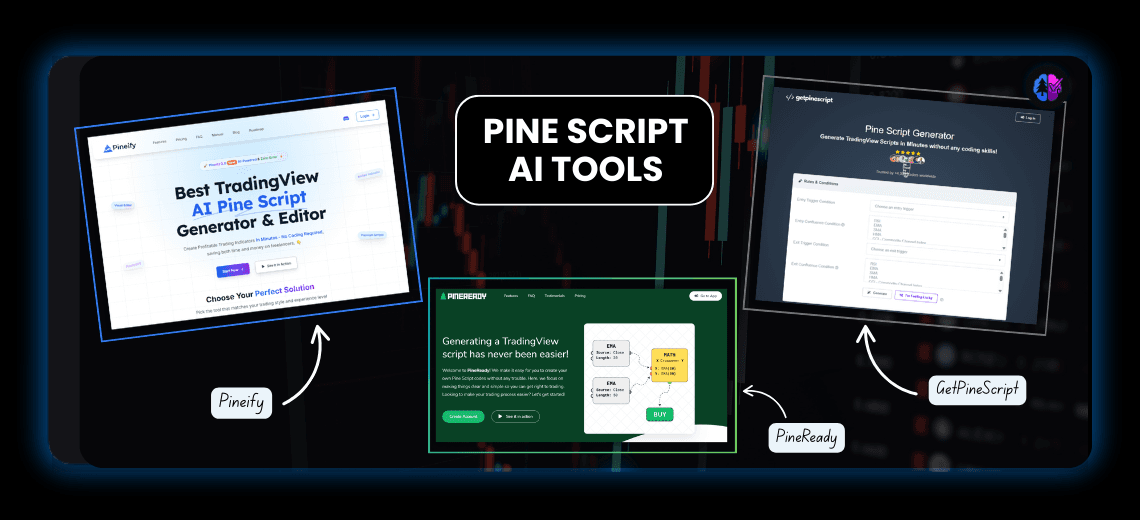
Pineify is best described as a drag-and-drop Pine Script builder. You use a visual interface to construct logic blocks like “If RSI > 70,” and PineifyGPT converts them into Pine Script.
✅ Pros:
-
Great for users who’ve never coded before.
-
Supports Pine Script v6.
-
Stable, bug-free outputs for standard strategies.
❌ Cons:
-
Less suited for users who want full code control.
-
Complex strategies often require stepping outside the visual builder.
-
Core features (like exporting) gated behind paid tiers.
Pineify’s strength is simplicity, not power. Ideal for newer traders — but once you learn logic, it starts to feel limiting.
Pine Script Wizard — Prompt-Based, Clean, Lightweight
This tool offers a very straightforward experience: type your strategy as a sentence, and it returns code based on GPT.
✅ Pros:
-
Extremely fast for single-condition strategies.
-
UI is clutter-free.
-
Affordable pricing (~$9/month).
❌ Cons:
-
No built-in tester or previewer.
-
Not ideal for advanced strategies or layered conditions.
-
Still prone to generic code output with ambiguous prompts.
Perfect if you already understand Pine Script and just want help writing cleaner code. Not a full development environment.
GetPineScript — Safe but Rigid Template Generator
GetPineScript abandons AI entirely and uses static templates. You select predefined rules (e.g., RSI, crossover logic), and it returns working code.
✅ Pros:
-
Bulletproof code — rarely any bugs.
-
No prompt errors or hallucinations.
-
Doesn’t require AI knowledge.
❌ Cons:
-
You’re locked into pre-built logic only.
-
No ability to extend or customize outputs.
-
Doesn’t support modern strategy design patterns.
Great for ultra-safe environments, such as educational or institutional use — but lacks flexibility for serious trading automation.
PineReady — Quick and Easy, But Too Shallow
PineReady is designed for speed. It lets you build common strategies quickly with dropdowns and pre-set options.
✅ Pros:
-
Extremely fast for simple indicators.
-
No learning curve.
-
Lightweight interface.
❌ Cons:
-
Not suitable for multi-condition or time-based logic.
-
Lacks visualization, alerts, or testing.
-
Doesn’t scale for professional use.
Think of it as a Pine Script snack bar — it satisfies small needs but leaves you hungry if you want depth.
Pinegen AI — AI-Powered Code + Live Testing Built In
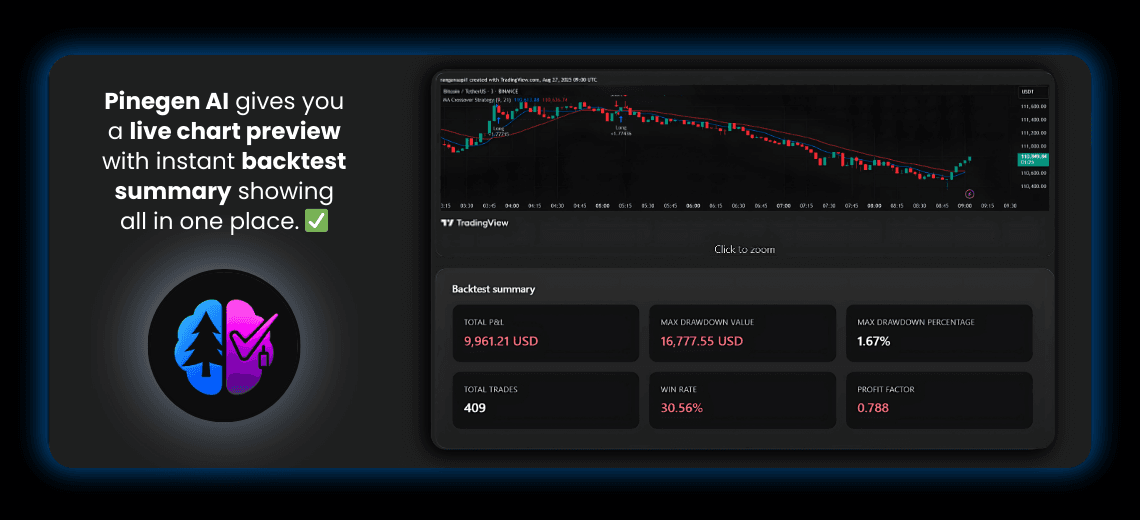
Now let’s talk about Pinegen AI, a newer but rapidly maturing platform purpose-built for AI-generated Pine Script — with one major difference: you can test and preview your strategy instantly inside the app.
Unlike prompt-only generators, Pinegen AI returns executable, tested code for indicators or strategies within seconds. But what sets it apart isn’t just the generation — it’s the integrated testing loop that reduces friction.
✅ What Pinegen AI Offers
1. AI-Trained Prompt-to-Code Engine (Purpose-Built for Pine Script)
Pinegen AI is not a general-purpose AI. Its model has been specifically tuned to understand trading terminology, Pine Script syntax, and common strategy logic. Whether you’re asking for an EMA crossover with stop-loss, or a multi-timeframe condition using RSI and ATR, the tool accurately converts natural language prompts into bug-free Pine Script.
2. Built-In Live Strategy Preview and Backtesting
What truly differentiates Pinegen AI is the ability to test and visualize your generated code directly within the platform. Instead of jumping to TradingView to validate signals, users get instant feedback through a visual preview and integrated backtester, dramatically reducing development cycles.
3. Support for Layered Logic and Complex Conditions
It understands nuanced prompts like:
“Only enter long when RSI is above 60 and MACD histogram is rising on the 15-min chart, with a 2:1 reward-to-risk ratio and ATR-based stop-loss.”
Most AI tools struggle with this level of specificity. Pinegen AI handles it reliably — generating complete strategies with clear entry/exit points, alerts, and dynamic stop/target logic.
4. Free Trial with Full Testing Access
New users can get started with a free trial, which includes access to the AI generator and backtesting tools — making it easy to test its capabilities before committing.
5. Pine Script Version 6 Compatibility
Pinegen AI supports Pine Script v6, ensuring compatibility with the latest TradingView updates and allowing users to take advantage of newer features and syntax.
What it doesn’t have (yet):
-
No Visual Editor Unlike drag-and-drop platforms, Pinegen AI is a prompt-based system. Users need to describe their strategy using natural language rather than assembling it visually. For some beginners, this might involve a learning curve.
-
Smaller (But Growing) Community As a newer platform, Pinegen AI doesn’t yet have the same forum activity, tutorial volume, or third-party integrations as more established tools. However, user traction is increasing steadily.
✳️ Real-World Use Example
Prompt Used:
“Create a 15-min strategy using EMA 20/50 crossover, filter entries with RSI above 60, use ATR-based stop-loss, set risk-reward at 2:1, and disable pyramiding.”
Result:
Pinegen AI returned clean, modular Pine Script code with:
-
Accurate entry and exit logic
-
Proper use of strategy parameters and alert conditions
-
Visual preview of entries/exits inside the platform
The entire process — from prompt to tested strategy — took less than 20 seconds, and reduced testing time by over 70% compared to traditional GPT tools that require manual debugging in TradingView.
🎯 Tips for Choosing the Right Pine Script Generator
- **Start with your goal: **
Decide whether you need a basic indicator, a full strategy, or something with entry/exit logic, alerts, and backtesting.
- Assess your experience level:
If you’re new to scripting, look for tools with visual support or guided setup. If you’re more experienced, choose tools that let you work with natural language or offer editable code.
- Consider testing needs:
Some tools let you test strategies instantly. Others require copying code into external platforms for validation.
- Think about long-term flexibility:
Template-based tools are quick for simple tasks, but can become limiting as your strategies grow in complexity.
- Optimize your workflow:
Tools that combine code generation, preview, and editing in one place will save you the most time.
💡 For users who want speed, customization, and built-in testing, Pinegen AI offers the most future-proof setup
Final Thoughts:
Each Pine Script tool reflects a trade-off:
-
Pineify is ideal if you’re learning or prefer visual logic.
-
Pine Script Wizard works for fast prototyping with prompts.
-
GetPineScript offers reliability at the cost of creativity.
-
PineReady is good for quick jobs but lacks depth.
But if you’re serious about:
-
Speeding up Pine Script development
-
Eliminating repetitive TradingView testing
-
Using AI without sacrificing code quality
…then Pinegen AI stands out as the most balanced and future-ready option. It’s not bloated, it’s not too guided — it just works, and it works fast.
It isn’t for everyone. But for those building, refining, and deploying trading strategies regularly, Pinegen AI shortens the cycle from idea → execution → validation like no other tool on the list.