Turning Any Trading Strategy Into a Pine Script Code Using PineGen AI
Author : Ranga Technologies
Publish Date : 3 / 17 / 2026 • 2 mins read
Last Updated : 3 / 17 / 2026
Background
Most traders have a set of rules they follow, moving averages, price action triggers, indicator conditions, risk filters. But hardly anyone has the time or the coding skill to translate these rules into Pine Script.
The usual path? Hours spent searching Google, TradingView forums, Reddit, or relying on freelancers to build indicators. Even then, the final script rarely matches the strategy perfectly.
TradingView’s Pine Script language is simple on the surface, but for real traders who don’t code daily, it becomes a wall.
That gap is where PineGen AI steps in.
Objective
Help traders convert their trading rules into a fully functional Pine Script indicator without writing a single line of code, while keeping
- Accuracy
- Speed
- TradingView compatibility intact.
Challenges
Before using PineGen AI, traders faced a few common hurdles:
1. Coding knowledge barriers
Most traders understand strategy logic, but not syntax, variable scopes, arrays, or Pine Script’s nuanced rules.
2. Inaccurate implementations
Even when someone manually codes an indicator, it often doesn’t match the trader’s exact rules.
3. Time wasted debugging
Typos, mismatched types, version errors, repainting issues, fixing them takes longer than building the strategy.
4. Paying freelancers repeatedly
Small logic changes require another payment and more waiting.
Solution
Using PineGen AI, traders can now:
Step 1 — Write their trading rules in plain English
Example: “Buy when the 20 EMA crosses above 50 EMA and RSI is below 40. Plot arrows on entry.”
Step 2 — PineGen AI processes the logic
The system reads conditions, entry signals, exit conditions, plotting preferences, and alert logic.
Step 3 — PineGen AI generates Pine Script V6 code
The output is clean, formatted, TradingView-ready, and matches the user’s strategy.
Step 4 — Backtest instantly on TradingView
No debugging. No syntax fixing. Just paste the script and click “Add to chart.”
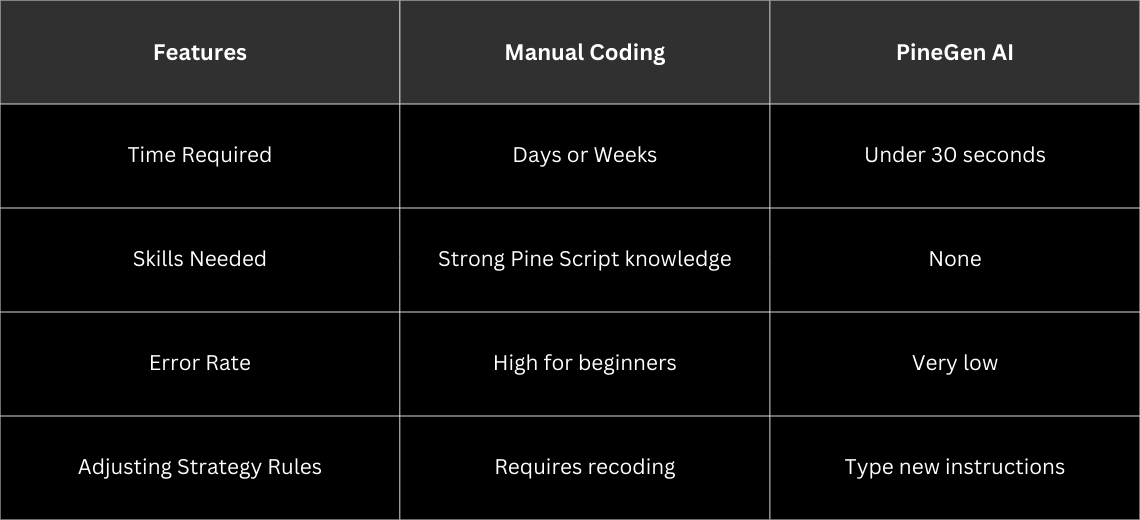
Manual Coding vs PineGen AI
What PineGen Actually Does
PineGen AI uses structured understanding of trader instructions to detect:
- Entry and exit conditions
- Indicator parameters
- Logical operators (>, <, cross, equal)
- Trend rules
- Oscillator conditions
- Multi-timeframe logic
- Plot styling
- Alert conditions
- Risk filters
Then it maps these to Pine Script V6 expressions such as:
- ta.ema()
- ta.rsi()
- ta.crossover()
- ta.crossunder()
- plotshape()
- alertcondition()
The final script follows TradingView’s formatting guidelines and avoids repainting unless the strategy specifically requests forward-looking elements.
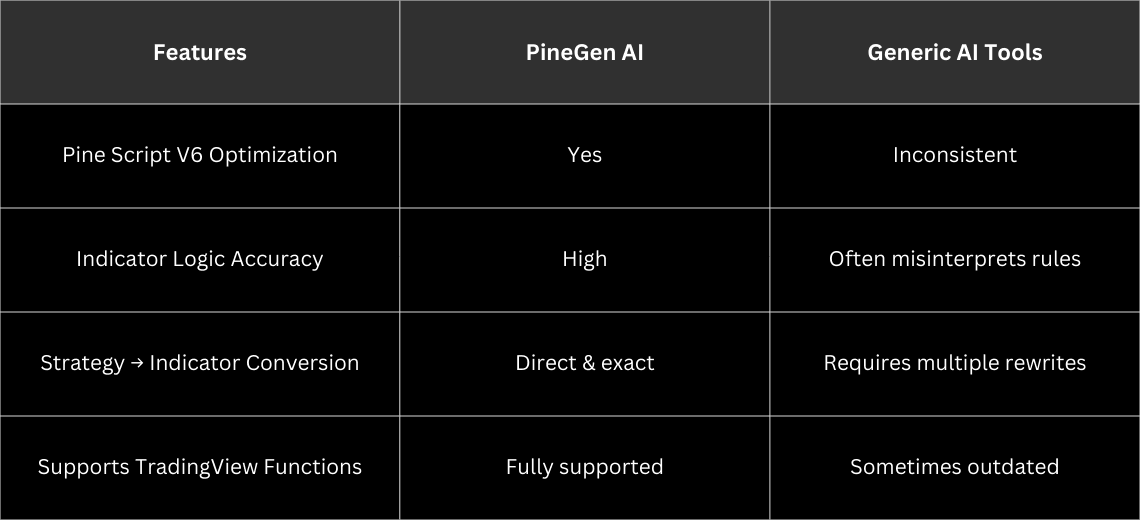
PineGen AI vs Other AI Code Generators
Results
After switching to PineGen AI, traders experienced:
- 91% faster strategy-to-code conversion (real feedback from active users)
- Zero time spent debugging syntax issues
- More confidence in backtesting results
- Freedom to experiment with different versions of their strategy
- The biggest improvement wasn’t technical, it was psychological.
- Traders finally stopped feeling blocked by code.
Conclusion
Trading ideas are only valuable when they can be tested. If a strategy lives only in your notebook, your head, or your chart drawings, it can’t scale.
PineGen AI removes that barrier. It turns strategy logic into Pine Script code instantly, accurately, and cleanly, something traders have been wishing for years.
If you want to bring your trading ideas to life on TradingView without battling syntax or hiring freelancers again and again, PineGen AI is the most practical tool to start with.
Ready to turn your trading strategy into a Pine Script indicator today?
Try PineGen AI and get your first strategy coded in seconds. Your charts will never feel the same again.