What Is the Difference Between Pine Script AI and Manual Coding?
Author : Ranga Technologies
Publish Date : 3 / 17 / 2026 • 3 mins read
Last Updated : 3 / 17 / 2026
Manual Pine Script coding gives full control but requires time, technical knowledge, and patience. Pine Script AI tools let traders describe strategies in simple language and receive ready-to-test scripts in seconds — making strategy creation faster, easier, and more accessible for all skill levels.
In the fast-evolving world of trading and technical analysis, automation has become a game-changer. Pine Script, the proprietary scripting language of TradingView, empowers traders to create custom indicators and strategies. However, there are two distinct ways to develop Pine Script code: manually writing the code yourself or leveraging AI-powered Pine Script Generators. Both approaches have their merits and drawbacks, and understanding the difference can help traders optimize their workflow.
What Is Manual Pine Script Coding?
When writing Pine Script manually, traders have the benefit of full control:
-
You decide exactly how every line behaves
-
You can write intricate logic using multi-timeframe inputs, condition chaining, or session filters
-
You’re able to optimize scripts for specific chart behaviors
But this level of control comes with trade-offs:
-
You need to know Pine Script well
-
It takes time to build and test each idea
-
Debugging can be frustrating, especially when combining multiple indicators or risk rules
Even simple strategies like an RSI filter with a trailing stop can take hours to write and refine.
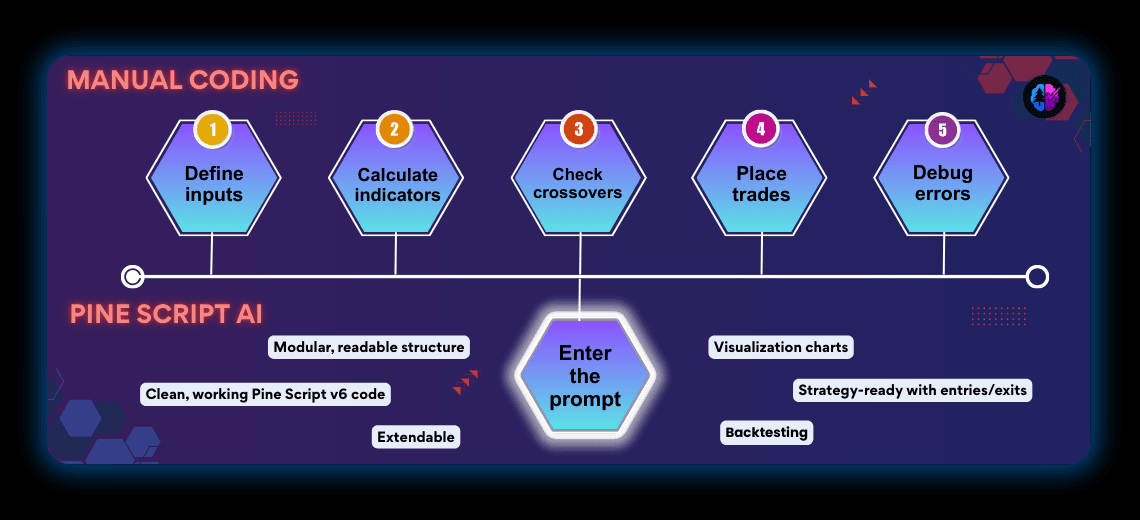
In plain terms: manual coding takes dozens of lines of code and debugging, while AI creates the same script instantly from a single sentence.
How Does Pine Script AI Work?
AI-powered Pine Script generators change the workflow completely. You type a prompt like:
“Create a long strategy where a 20 EMA crosses above a 50 EMA, and exit if RSI goes above 70.”
The AI returns fully formed Pine Script code — formatted, commented, and ready to test.
This approach is especially helpful if:
-
You’re new to coding
-
You want to test multiple strategy ideas quickly
-
You’re focused on trading logic, not technical syntax
Real Case Example: RSI Entry + MACD Exit
Let’s walk through a simple, real-world use case:
✅ Manual Coding Approach
To write a strategy where:
-
Entry happens when RSI crosses below 30, and
-
Exit happens when MACD crosses below its signal line
You’d need to:
1.Define RSI and MACD inputs
2.Use ta.rsi(close, 14) and ta.macd(close, 12, 26, 9)
3.Handle crossover conditions using ta.crossover() and ta.crossunder()
4.Apply strategy.entry() and strategy.close()
5.Debug errors like mismatched series types or indentation issues
For a beginner, this can be overwhelming — even with copy-paste templates.
✅ Pine Script AI Approach
Instead, you input a simple command:
“Write a strategy that enters when RSI is below 30 and exits when MACD crosses below signal line.”
The AI instantly returns:
-
Clean, working Pine Script code
-
Proper MACD structure using macdLine, signalLine, histogram
-
RSI logic using the correct length and condition
-
Strategy-ready code with version 6 declaration and trade handling
Even better: you can then say:
“Add a 1.5x ATR stop-loss”
And the AI builds upon your original strategy without starting over.
This kind of iterative development flow is impossible with static templates and hard to replicate manually.
What We Learned from Real User Prompts
In testing, we submitted more than 30 different Pine Script strategy prompts to a range of tools, including PineGen AI, Pineify, Pine Script Wizard, GetPineScript, and PineReady.
The results were telling.
Most tools delivered mixed outcomes — some scripts compiled but missed critical logic, others used outdated syntax, and many required manual fixes before they could even run. By contrast, PineGen AI consistently stood out. It was the only tool that generated valid Pine Script v6 code every time with a clean, modular, and readable structure allowed iterative updates, so you could keep building on your strategy without rewriting the entire prompt
This consistency is what makes PineGen AI particularly valuable for beginners and non-coders. Instead of wrestling with broken scripts, users can focus on their trading ideas and strategy performance.
Why Pine Script AI Tools Differ in Quality
Not all Pine Script AI tools deliver the same level of accuracy or reliability. Some tools generate partial scripts that need manual fixes, while others produce clean, ready-to-test code. The difference often comes down to how well the AI has been trained on Pine Script logic and trading workflows.
Specialized Pine Script AI tools perform better because they’re built with TradingView scripting in mind. This means it can handle not just code syntax, but also real-world strategy elements such as:
-
ATR-based stop-losses
-
RSI filtering and thresholds
-
Trailing exits and confirmation signals
Modular structure for easier learning and adjustments
This focus on Pine Script ensures more consistent, usable outputs — a key advantage for traders who want to move quickly from idea to backtest without spending hours troubleshooting broken code.
What Makes PineGen AI Different?
From all Pine Script AI tools tested, PineGen AI consistently performs better for real-world use cases. Here’s what makes it stand out:
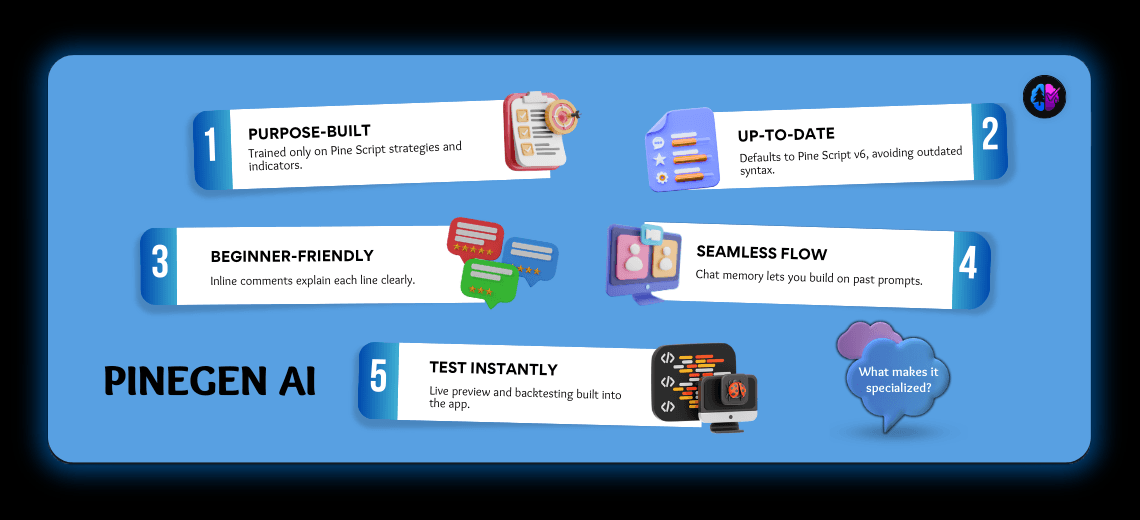
✅ Trained exclusively on Pine Script strategies and indicators
✅ Defaults to Pine Script v6, avoiding outdated syntax
✅ Includes inline comments, so beginners understand what each line does
✅ Has chat memory, meaning you can build on previous prompts without restarting
✅ Supports live previewing and testing directly in the app
This combination is rare.
While PineGen AI performed strongest, traders may still find value in other tools depending on their needs, such as visual simplicity or lightweight generation.
Final Thoughts: Let the Code Teach You
The choice between manual coding and Pine Script AI isn’t about one being better. It’s about where you are in your trading or development journey.
-
If you’re learning Pine Script from scratch, AI shows you how logic becomes code.
-
If you’re testing fast ideas, AI saves hours of dev time.
-
If you’re building custom frameworks, manual scripting still gives ultimate flexibility.
But here’s the real takeaway:
In a market where speed and testing cycles matter, Pine Script AI tools — especially PineGen AI — have become essential. Not just as generators, but as learning accelerators and workflow enhancers.