How Can AI Help Debug Pine Script Faster?
Author : Ranga Technologies
Publish Date : 3 / 17 / 2026 • 1 mins read
Last Updated : 3 / 17 / 2026
Debugging Pine Script is one of the most challenging aspects of strategy development on TradingView. PineGenAI accelerates this process using AI-powered code analysis, logic validation, and visual aids — helping traders identify bugs and improve reliability without deep manual debugging.
Why Is Debugging Pine Script So Difficult?
Pine Script, while simple in syntax, is notoriously hard to debug due to its series-based data, runtime limitations, and lack of traditional debugging tools. Even advanced traders and coders often struggle with vague errors, unexpected behaviors, and inefficient loops.
This is where PineGenAI steps in — providing AI-powered code generation and debugging help that simplifies every stage of development. While it doesn’t write blog posts or provide trading advice, it does generate, fix, and optimize Pine Script code based on your strategy description.
What Are the Most Common Pine Script Errors?
Let’s break down the typical categories of bugs users encounter:
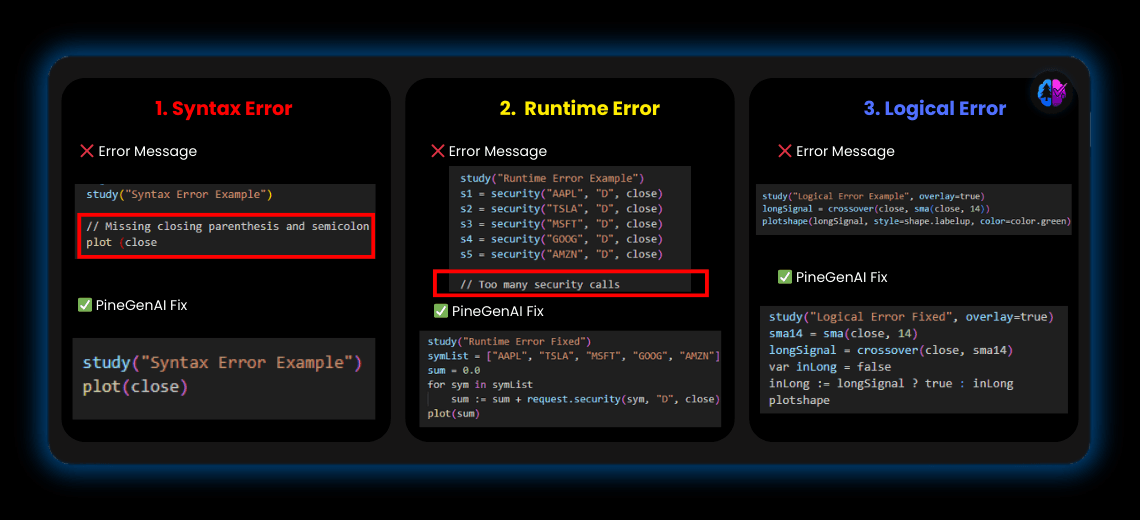
1. Syntax Errors
These occur when the script violates Pine Script grammar — like:
Missing parentheses or curly braces
Incorrect indentation
Using reserved words as variable names
🛠 Fix Tip: TradingView flags these in the editor. Still, PineGenAI goes further — auto-correcting syntax before you even paste it in TradingView.
2. Runtime Errors
These only appear after execution starts and include:
Too many security() calls
Exceeding loop limits
Accessing too much historical data
⚠️ These can crash your script or trigger weird behavior.
🧠 Fix Tip: PineGenAI refactors these automatically, optimizing security calls and suggesting max_bars_back values.
3. Logical Errors
Scripts may run fine, but produce bad signals due to:
Incorrect condition chaining
Misused series vs. literal variables
Poor use of stateful logic (e.g., crossover handling)
🔍 Fix Tip: PineGenAI understands natural language strategy logic, then compares it with your code — flagging inconsistencies.
How Does PineGenAI Help with Debugging?
Here’s exactly how PineGenAI helps you find and fix bugs fast — no guesswork required:
🧠 AI Code Analysis and Correction
Just paste your code or describe your trading logic. PineGenAI:
Detects syntax and runtime errors
Highlights risky operations
Auto-suggests fixes or cleaner code structures
💡 Example: “Crossover but signal is missing” → PineGenAI checks the ta.crossover() logic and series state.
🔁 Automated Refactoring
AI rewrites:
Nested conditions
Loop-heavy sections
Inefficient security() calls
This prevents execution limits and improves code readability.
✅ Logical Validation
You describe the strategy; PineGenAI:
Cross-checks intent vs. actual behavior
Flags logic that may produce false signals
Suggests conditions that should or shouldn’t be combined
🧩 Stepwise Debugging Assistance
It modularizes your script:
Splits long sections into testable functions
Helps isolate broken logic
Guides on best variable scope
📦 Easier to test one block at a time!
📊 Visual Debugging Aids
Want to see what’s happening under the hood? PineGenAI:
Adds plot() lines for key variables
Generates label.new() markers at key events
Helps you visualize crossovers, exits, or zones
What Are Best Practices for Manual Debugging?
Even with AI, you should follow smart habits. Here’s a checklist:
✅ Test small code sections Break big scripts into testable blocks.
✅ Plot and label everything Use plot(), plotshape(), and label.new() to track key values.
✅ Use Pine logs Use label.new(bar_index, high, str.tostring(var)) for on-chart logging.
✅ Cache security calls Store them in variables, don’t recalculate on every line.
✅ Limit loops Avoid infinite or very long for loops.
✅ Set max_bars_back Declare it to prevent historical reference errors.
✅ Validate all user inputs Prevent NaNs or nulls from breaking the logic
How to Use PineGenAI to Fix a Broken Script
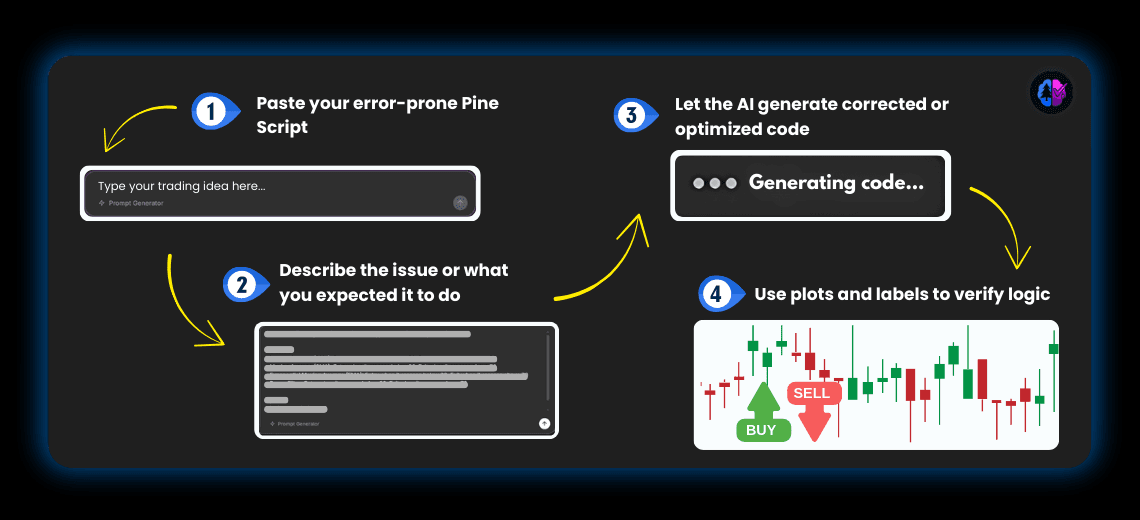
- Paste your error-prone Pine Script
- Describe the issue or what you expected it to do
- Let the AI generate corrected or optimized code
- Use plots and labels to verify logic
🎯 It’s that easy.
Real-World Example: Debugging a Crossover Strategy
Scenario:
A trader creates a strategy that buys when the 9 EMA crosses the 21 EMA, but it doesn’t trigger.
Original Code Bug:
if ta.crossover(ema(close, 9), ema(close, 21))
   strategy.entry("Buy", strategy.long)
AI-Corrected Version:
AI-Corrected Version:
fastEMA = ta.ema(close, 9)
slowEMA = ta.ema(close, 21)

buySignal = ta.crossover(fastEMA, slowEMA)
plotshape(buySignal, location=location.belowbar, color=color.green, style=shape.labelup)

if buySignal
   strategy.entry("Buy", strategy.long)
✅ Adds clarity
✅ Plots visual signals
✅ Works reliably