Why PineGen AI Is Now More Reliable Than Ever: PineGen AI 2.0 Major Upgrades
Author : Ranga Technologies
Publish Date : 5 / 4 / 2026 • 1 mins read
Last Updated : 5 / 4 / 2026

Ever spent hours debugging a Pine Script that should work… but doesn’t?
You write the logic. You paste it into TradingView. Then the compiler throws errors… or the strategy behaves differently in the strategy tester.
Now imagine describing a trading idea and getting a fully compiled Pine Script strategy with structured code and visual preview in minutes. That’s the direction PineGen AI 2.0 is pushing toward.
In 2026, PineGen AI matured into one of the most dependable platforms for generating Pine Script strategies. With far fewer compilation issues, improved code quality, a redesigned interface, live progress tracking, and workflow features for traders and teams, it reduces the friction between strategy ideas and executable TradingView code.
This article explains what changed in PineGen AI 2.0, why reliability improved, and what new tools make the platform easier to use.
1. The Pine Script Coding Bottleneck
Pine Script is the core scripting language for building indicators and strategies on TradingView. It powers custom technical analysis tools and automated trading systems.
But writing Pine Script manually often leads to several challenges:
• syntax errors
• version conflicts between Pine Script versions
• repainting logic mistakes
• broken strategy tester results
• hours spent debugging small mistakes
Generic AI tools sometimes generate Pine Script code, but those scripts frequently:
• fail to compile
• include outdated Pine Script syntax
• miss key strategy elements like exits or risk management
This creates a frustrating loop of generate → fix → test → repeat. PineGen AI was designed specifically to solve that workflow problem.
2. What Is PineGen AI?
PineGen AI is a specialized AI platform built specifically for Pine Script generation and strategy development.
Instead of acting like a general chatbot, it focuses on the Pine Script ecosystem and provides: • Pine Script v6 strategy generation
• strategy visualization with charts
• integrated backtesting preview
• structured code output
• debugging assistance
You can simply describe a strategy idea in natural language and PineGen AI will generate the corresponding Pine Script code designed to run on TradingView.
The platform acts as a Pine Script development tool, helping traders move faster from idea to executable strategy.
3. Why PineGen AI 2.0 Matters Now
The 2.0 version introduces several upgrades that significantly improve reliability and user workflow.
The biggest improvements include: • extremely rare compilation issues
• cleaner and more structured code generation
• real-time generation progress feedback
• improved UI and onboarding flow
• better workflow tools for teams and long-term users
These upgrades focus on making the strategy generation process predictable and stable, which is critical when working with trading logic.
4. How PineGen AI Works
The platform simplifies Pine Script creation into a few steps.
1. Describe your strategy idea Example prompt: “Create a 50/200 EMA crossover strategy with stop loss and take profit.”
2. AI generates Pine Script v6 code The code is structured with proper inputs, indicators, and entry logic.
3. Visual preview appears You can see the strategy signals and chart behavior without immediately exporting to TradingView.
4. Backtest results appear Performance summaries help verify whether the logic behaves as expected.
5. Export or copy the code You can copy the code into the TradingView Pine Script editor or refine it further.
This reduces the need for constant switching between editors and testing environments.
5. PineGen AI 2.0 Major Upgrades
The biggest difference in PineGen AI 2.0 lies in reliability improvements and workflow visibility.
Below are the major upgrades.
5.1 No More Compilation Issues
Earlier Pine Script AI tools often produced scripts that failed to compile in TradingView.
With PineGen AI 2.0, compilation failures are now extremely rare.
The system generates Pine Script v6 code with correct syntax structure and proper function usage.
For users this means:
• fewer debugging sessions
• less time fixing syntax
• faster path from idea to working strategy
This reliability is one of the most important improvements in the new version.
5.2 Better Code Quality (Structured Output)
Generated Pine Script code is now cleaner and more structured. Instead of producing random blocks of code, PineGen AI follows a consistent format: • clearly defined inputs
• indicator calculations grouped logically
• entry and exit rules separated
• readable variable names
• proper strategy declarations
This structured approach makes strategies easier to: • understand
• modify
• expand later
For developers and traders who refine strategies over time, readable code is critical.
5.3 Progress Bar With Live Status
One of the most visible improvements is the progress bar system with live generation status. Instead of waiting without feedback, users now see real-time stages of the AI process.
Typical statuses include:
• Analyzing Prompt – understanding the trading logic request
• Generating Strategy Logic – building the Pine Script structure
• Compiling Code – validating the script for syntax accuracy
• Rendering Chart Preview – generating the visual output
• Preparing Backtest Summary – calculating strategy performance
This progress tracking improves transparency and lets users know exactly where the generation process stands.
5.4 Clean, Advanced UI
The PineGen AI interface has been redesigned to make the platform easier to navigate.
Key improvements include:
• simplified dashboard layout
• faster access to generation tools
• cleaner visual hierarchy
• improved responsiveness
The login process has also been streamlined, making onboarding easier for new users.
For beginners, a simple interface reduces the intimidation factor often associated with coding tools.
For experienced traders, it speeds up workflow.
5.5 Schedule a Meeting Feature
A new meeting scheduling system allows users to connect directly with the PineGen team.
This feature helps users:
• discuss complex strategy ideas
• get guidance on Pine Script logic
• troubleshoot workflow questions
• understand advanced features
Meetings can be scheduled directly from the platform interface, which makes support more structured compared to traditional support tickets.
5.6 Credit Usage History
PineGen AI now includes credit usage tracking.
Instead of guessing how credits are consumed, users can view detailed history showing:
• prompts submitted
• credits used per request
• timestamps for usage
Credits are charged based on the prompt and generation complexity, as explained in the platform manual.
This transparency helps users manage their usage and avoid unexpected credit depletion.
5.7 Saved Backtest Results
Another important upgrade is the ability to save backtest results. Users can now revisit previous strategy results anytime without regenerating the script.
This is useful because traders often:
• compare different strategies
• revisit earlier experiments
• analyze historical performance
Saved backtest summaries make long-term strategy research easier and more organized.
6. Minor Improvements
PineGen AI 2.0 also includes smaller but useful upgrades.
6.1 Customer Support Chat Notifications
Users can now enable notifications for the support chat, ensuring responses are not missed.
6.2 Updated Manual and FAQ
The documentation has been expanded to provide:
• clearer instructions
• feature explanations
• troubleshooting guidance
A detailed manual reduces confusion and helps new users understand the platform quickly. Check out: manual
7. Comparison With Other AI Tools
Community discussions frequently compare PineGen AI with other tools like Pineify or generic AI chatbots.
Generic AI tools often struggle with:
• Pine Script syntax accuracy
• correct TradingView functions
• strategy structure
Because PineGen AI is specialized for Pine Script, it focuses on producing strategies that are closer to execution-ready code. However, some advanced traders still refine strategies manually for very complex logic, which is normal for any AI-assisted development tool.
8. Strategy Example
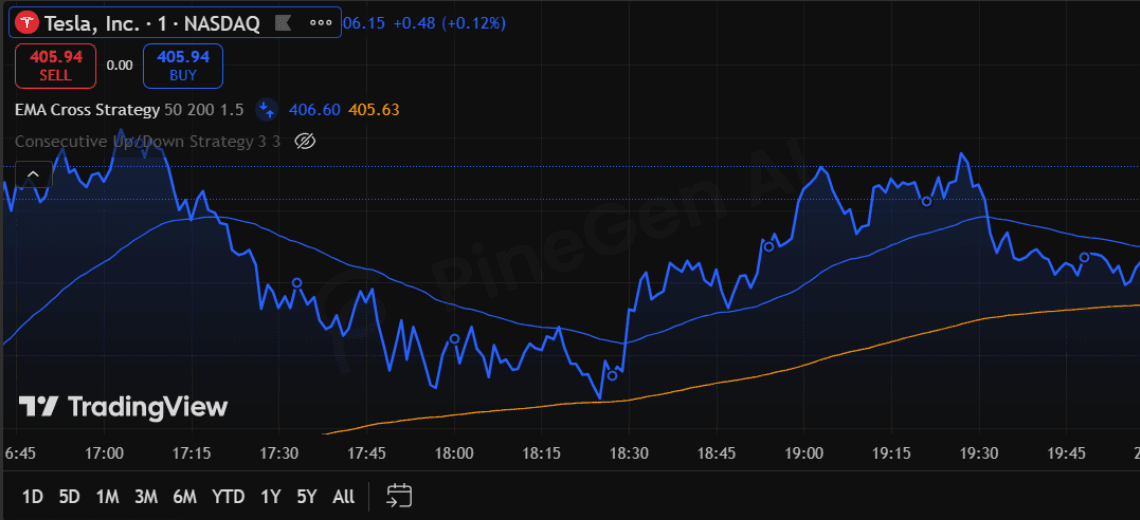
Here is a simple Pine Script strategy that reflects the type of structured output generated by PineGen AI.
//@version=6
strategy("EMA Cross Strategy", overlay=true)

// Inputs
fast_len = input.int(50, "Fast EMA")
slow_len = input.int(200, "Slow EMA")
sl_pct   = input.float(1.5, "Stop Loss %")

// Calculate EMAs
fastEMA = ta.ema(close, fast_len)
slowEMA = ta.ema(close, slow_len)

// Entry logic
longSignal = ta.crossover(fastEMA, slowEMA)
if longSignal
    strategy.entry("Long", strategy.long)

// Stop Loss & Exit
strategy.exit("Exit Long", "Long", stop=close * (1 - sl_pct / 100))

plot(fastEMA, color=color.blue)
plot(slowEMA, color=color.orange)
This code includes:
• readable inputs
• logical indicator calculations
• basic risk management
• clear plotting structure
Exactly the type of output that saves time during strategy development.
9. Conclusion
PineGen AI 2.0 represents a significant step forward for Pine Script automation.
The platform now offers:
• extremely reliable code compilation
• cleaner and more maintainable strategy output
• transparent progress tracking during generation
• a modern, user-friendly interface
• workflow tools like saved backtests and credit history
For traders who want to focus on strategy ideas instead of debugging syntax, PineGen AI provides a practical solution. Instead of spending hours fixing errors and rewriting scripts, you can generate structured Pine Script strategies quickly and refine them with confidence.