How to Use Multi-Timeframe Analysis in Pine Script?
Author : Ranga Technologies
Publish Date : 5 / 22 / 2026 • 2 mins read
Last Updated : 5 / 22 / 2026
Are You Reading the Market From Only One Timeframe While Smart Traders Use Three?
Many beginner traders make decisions using only one chart timeframe.
For example:
-
entering trades from the 5-minute chart
-
confirming signals only from the 15-minute chart
-
ignoring higher timeframe market structure completely
At first, this feels simple and fast.
But over time, many traders realize something frustrating:
The setup looked perfect on one timeframe… but failed immediately because the larger trend was moving against it.
This is exactly why multi-timeframe analysis has become one of the most important concepts in modern trading.
Professional traders rarely rely on a single timeframe alone. Instead, they combine:
-
higher timeframe trend direction
-
mid-timeframe confirmation
-
lower timeframe entries
to improve:
-
trade accuracy
-
trend alignment
-
signal quality
Multi-timeframe analysis helps traders align entries, trend direction, and confirmation signals across multiple chart timeframes. Instead of relying on a single chart view, traders combine higher timeframe structure with lower timeframe execution to improve consistency and reduce weak trades.
This article explains how multi-timeframe analysis works inside Pine Script, how TradingView handles higher timeframe data using request.security(), common repainting mistakes, and how PineGen AI helps traders generate structured multi-timeframe strategies faster.
1. What Is Multi-Timeframe Analysis?
Multi-timeframe analysis means using more than one chart timeframe to make trading decisions.
Instead of relying only on:
-
the 5-minute chart
-
the 15-minute chart
-
or the 1-hour chart
traders combine different timeframes together to understand:
-
overall market trend
-
short-term momentum
-
entry timing
-
risk conditions
For example:
-
the daily chart may define the major trend
-
the 1-hour chart may confirm momentum
-
the 5-minute chart may provide precise entries
This creates a more structured view of the market.
The idea is simple:
lower timeframes move inside higher timeframe structure.
If traders ignore that larger structure, they often enter trades directly against stronger market momentum without realizing it.
2. Why Traders Use Multiple Timeframes
Markets behave differently depending on timeframe perspective.
A 5-minute chart may look bullish temporarily, while the daily chart remains strongly bearish overall.
This creates confusion for many traders.
Multi-timeframe analysis helps filter low-quality setups by aligning trades with broader market direction.
2.1 Higher Timeframes Show Market Structure
Higher timeframes help traders identify:
-
dominant trend direction
-
major support and resistance
-
institutional momentum
-
broader volatility behavior
These charts usually contain less noise compared to lower timeframes.
For example:
-
a 1-minute chart may show random fluctuations
-
a daily chart shows larger directional structure
Many traders use higher timeframes to avoid trading against dominant market momentum.
2.2 Lower Timeframes Improve Entry Precision
Lower timeframes help traders:
-
refine entries
-
reduce stop-loss distance
-
improve risk-to-reward ratios
-
identify momentum shifts earlier
Instead of entering blindly from a daily chart, traders often wait for lower timeframe confirmation.
This combination improves execution quality.
3. The Biggest Mistakes Beginners Make
Many beginner traders misunderstand multi-timeframe analysis.
They often:
-
use too many timeframes simultaneously
-
mix unrelated signals
-
create conflicting conditions
-
misuse higher timeframe data
This leads to inconsistent strategies.
The goal is not to use “more charts.”
The goal is to create:
-
structured confirmation logic
-
clean trend alignment
-
efficient decision-making
Good multi-timeframe analysis is organized, not chaotic.
4. How Pine Script Handles Higher Timeframes
TradingView uses the request.security() function to access data from other timeframes.
This is one of the most important functions in Pine Script for multi-timeframe systems.
Example:
pinescriptdailyEMA = request.security(
    syminfo.tickerid,
    "D",
    ta.ema(close, 50)
)
This means:
-
request daily timeframe data
-
calculate 50 EMA
-
return the result to the current chart
This allows traders to combine:
-
higher timeframe trend filters
-
lower timeframe entries
-
cross-timeframe confirmation logic
inside one strategy.
5. Understanding request.security()
The request.security() function is powerful, but many traders misuse it.
Basic structure:
pinescriptrequest.security(symbol, timeframe, expression)
Where:
-
symbol = market symbol
-
timeframe = higher/lower timeframe
-
expression = calculation performed
Example:
pinescripthtfRSI = request.security(
    syminfo.tickerid,
    "240",
    ta.rsi(close, 14)
)
This retrieves:
-
4-hour RSI
-
even if current chart is lower timeframe.
This is how traders build:
-
higher timeframe confirmation
-
market filters
inside TradingView strategies.
6. Multi-Timeframe Repainting Problems
This is one of the most misunderstood parts of Pine Script.
Many traders accidentally create repainting strategies when using higher timeframe data.
Why?
Because higher timeframe candles are still forming.
Example:
-
current 4-hour candle is incomplete
-
values continue changing until candle closes
If traders use unfinished higher timeframe values incorrectly:
-
signals appear perfect historically
-
but fail in live conditions
This creates misleading backtests.
7. How To Reduce Repainting
Many traders use:
- barstate.isconfirmed
or confirmed higher timeframe logic to reduce repainting behavior.
Proper multi-timeframe systems require:
-
confirmation handling
-
structured security requests
-
realistic execution assumptions
This is one reason why many AI-generated Pine Script strategies fail in real markets despite strong backtests.
8. Building a Multi-Timeframe Strategy
A common structure looks like this:
Higher Timeframe: Defines overall trend.
Mid Timeframe: Confirms momentum.
Lower Timeframe: Executes entries.
This layered structure improves signal quality significantly compared to single-timeframe systems.
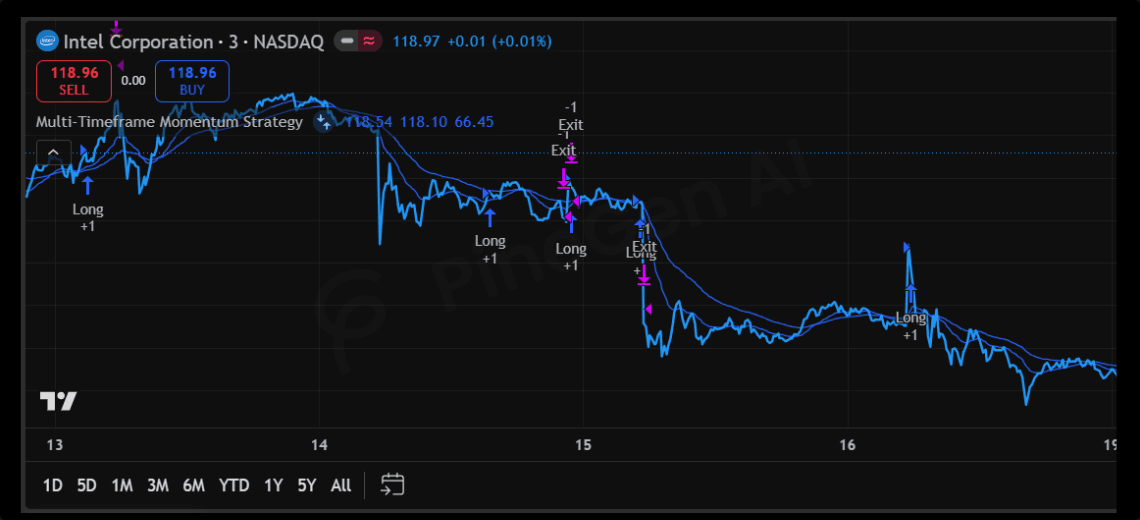
9. Large Pine Script Example
pinescript//@version=6
strategy("Multi-Timeframe Momentum Strategy", overlay=true)

// Current Timeframe EMAs
fastEMA = ta.ema(close, 20)
slowEMA = ta.ema(close, 50)

// Higher Timeframe Trend
htfEMA = request.security(
    syminfo.tickerid,
    "240",
    ta.ema(close, 200)
)

// Higher Timeframe RSI
htfRSI = request.security(
    syminfo.tickerid,
    "240",
    ta.rsi(close, 14)
)

// Current Timeframe MACD
[macdLine, signalLine, histLine] =
    ta.macd(close, 12, 26, 9)

// ATR Volatility
atrValue = ta.atr(14)

// Volume Confirmation
volumeMA = ta.sma(volume, 20)

// Conditions
bullTrend = close > htfEMA
bullRSI = htfRSI > 50
bullMACD = ta.crossover(macdLine, signalLine)
strongVolume = volume > volumeMA

// Entry Logic
longCondition = (
    bullTrend and
    bullRSI and
    bullMACD and
    strongVolume
)

// Entry
if longCondition
    strategy.entry("Long", strategy.long)

// Dynamic Exit
strategy.exit(
    "Exit",
    from_entry = "Long",
    stop = close - atrValue * 2,
    limit = close + atrValue * 3
)

// Visuals
plot(fastEMA, title="Fast EMA")
plot(slowEMA, title="Slow EMA")
plot(htfEMA, title="Higher Timeframe EMA")
This structure combines:
-
higher timeframe trend filtering
-
momentum confirmation
-
volatility-based exits
-
volume validation
inside one TradingView strategy.
10. Why PineGen AI Helps With Multi-Timeframe Strategies
Multi-timeframe Pine Script systems can become complicated quickly.
Many traders struggle with:
-
request.security() structure
-
repainting logic
-
strategy alignment
-
execution inconsistencies
General AI coding tools often generate Pine Script that:
-
misuses higher timeframe data
-
creates unstable repainting logic
-
requires extensive manual fixes
PineGen AI focuses specifically on TradingView workflows.
Instead of spending hours fixing syntax and security request problems, traders can focus more on:
-
strategy refinement
-
market adaptation
-
testing multiple ideas
11. Conclusion
Multi-timeframe analysis remains one of the most effective ways to improve market structure awareness inside TradingView strategies.
Instead of relying on one isolated chart view, traders combine:
-
higher timeframe direction
-
momentum confirmation
-
lower timeframe execution
to improve consistency and reduce weak entries.
But building these systems manually inside Pine Script can become complicated quickly.
Multi-timeframe strategy development can become frustrating fast.
Many traders spend hours:
-
debugging repainting problems
-
restructuring strategy conditions
-
testing higher timeframe logic manually
That slows strategy development dramatically.
PineGen AI helps traders:
-
generate TradingView strategies faster
-
structure Pine Script workflows correctly
-
reduce debugging frustration
-
iterate ideas more efficiently
-
improve TradingView automation workflows
Whether you are:
-
building momentum systems
-
creating higher timeframe filters
-
testing volatility strategies
-
learning Pine Script development
PineGen AI helps reduce development friction so you can focus more on strategy quality instead of repetitive coding problems.
Start building smarter multi-timeframe TradingView strategies with PineGen AI today.